
Customizable Weather

Final designs not only included the new features mentioned but also held to the original design in certain aspects in an attempt to hold what the Weather Channel already had in place and also provide users with a sense of familiarity when navigating the new design.
Throughout the project, my role was to design wireframes, prototypes, and mockups, while also helping in usability testing of prototypes, and synthesis of test data to help in the design of further iterations and in the presentation of the project to our fellow classmates. Helping to conduct daily standups to ensure team members were on track and were not encountering any blockages was a part of my role as well. I also would help my classmates through any blockages that occurred during stand up and throughout the project.
The Weather Channel was brought to myself and one other cohort member in our class as a spec project to help in designing a feature that would attract and retain new and current users. Through research, we were able to design features that would allow for customization of content and the ability to sync calendared events to the app in order to receive event-specific weather updates.
To begin, the initial problem presented for The Weather Channel was they needed a way to attract new users and retain users through their current app. Surveying and interviewing users introduced a variety of aspects that were initially not considered.
Cloudy Connections
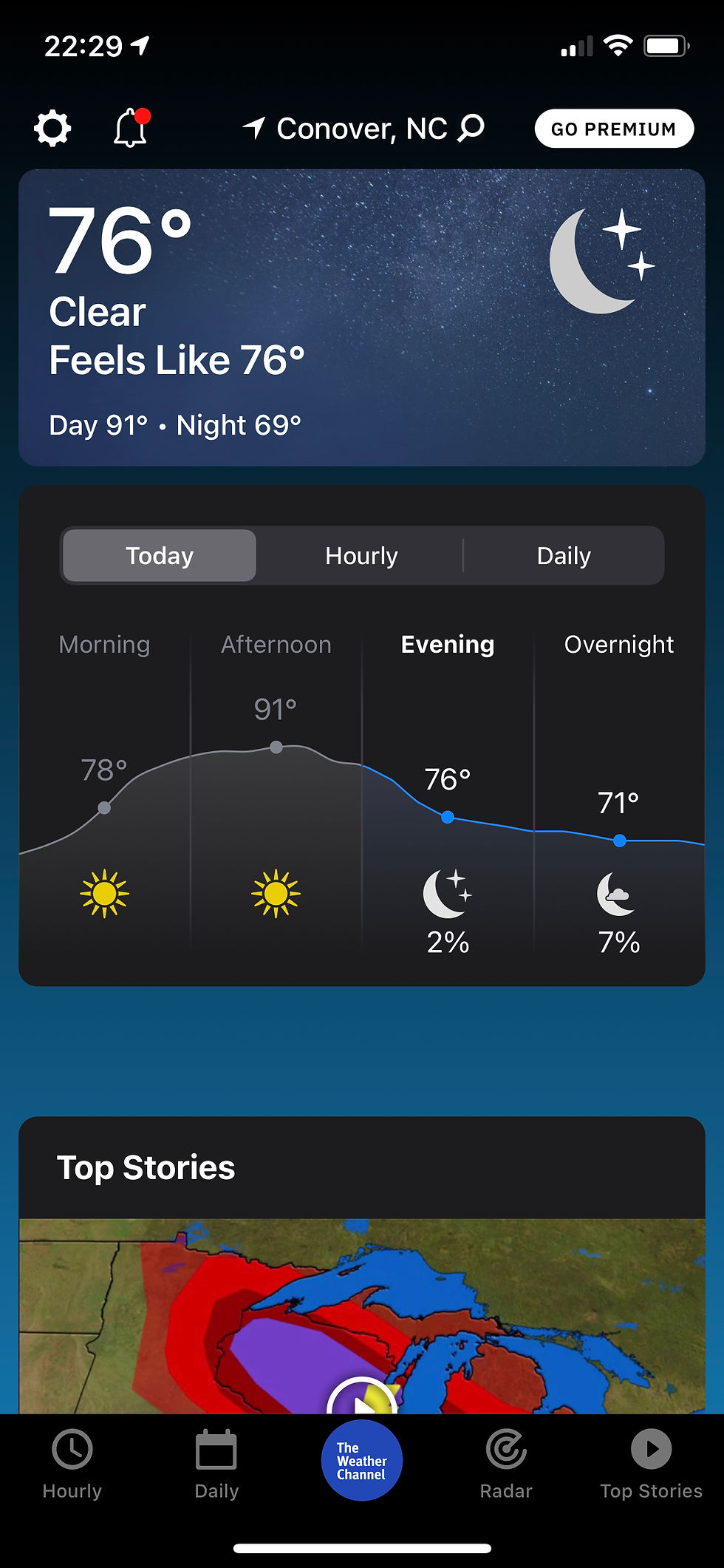
Original Weather Channel App Dashboard
Our problem statement for Renee was “Renee needs a way to check weather information directly relevant to her so that she feels confident in her outdoor activity planning.”
Our questions mainly focused on the reason for checking the weather. Answers ranged from simply wanting to know the weather outlook for the day to being a huge deciding factor of whether or not to take trips; be it personal or business and the mode and route to travel.
Once the data from our surveys and interviews had been synthesized, we came up with the user persona of Renee Gonzalez; a 27-year-old Asset Logistics Coordinator living in New York City.
Low Pressure
Designs
The designing stage began after our data had been synthesized into several user flows. These flows translated into simple, paper sketched wireframes, which became low fidelity wireframes and a prototype. With the completion of our first prototype, we began our first round of usability testing.
Users were instructed to perform two tasks. The first, to navigate through the informational landing page that informed users about changes that had been made. Eventually leading them to check off what they wanted to see on their dashboard/homepage. The second task was to enter the app and find the calendar event. The user then was instructed to view the events for a specific day and then check the weather for a particular weather pattern.

A Change in Design
Once our first round of testing data had been surveyed, changes were made. Specifically, the calendar option to be more identifiable to users, changing our calendar placeholder to an updated date, and placing text on listed calendar events that indicated users could select it and view the weather for a selected event.
No issues were mentioned about the customization feature as a whole. Text was changed in an attempt to draw users into trying the new customization feature by using a more inviting and exciting tone in the writing.


Once our iterations were complete, we commenced round two of usability testing. Tasks were somewhat similar but were more defined rather than stating a generalized task. Our results proved successful as all users completed the tasks successfully and under our two-minute goal. Some users even expressed interest in further iterations of the customization feature and hoped to see more features become available.
Final Designs
The final design of the Weather Channel app produced a clean design that still followed the original Weather Channel app and its style, while also taking into consideration the needs of their users.
Simply designing for the ability to customize a user’s dashboard/homepage allowed users to have more control over what they wanted to see, which helped to organize the dashboard/homepage into a clean, simple, and flexible design.


This also would help reach the business goals of not only attracting and retaining new users, but still allowed for the company to place information such as ads, featured stories, and sponsored material where users could still see it, without it cluttering the users’ spaces. In other words, the new design enabled for a bridge to be built between business and user that maintained what was already in place and improved upon it at the same time.
Sunny Skies Ahead
Moving forward, future iterations had been discussed as to how we might better improve the users’ experience in the customization feature. As mentioned, several users expressed interest in being able to move the tiles of information around to how they liked. We also looked to include a way for users to either skip customization and enter the old layout or turn it off if they did not want to partake in the customization feature anymore.
For the business aspect, future iterations would implement clearer placeholders for locations of ads and sponsored material that would still allow for users to have control over their dashboard/homepage.
With the calendar feature, a couple of users expressed concerns about privacy and being able to edit within the app and it syncing to their native calendar. Future iterations would look into ensuring the privacy and safety of users were implemented and expressed. If users did choose to sync the calendar, future iterations would look at allowing users to edit information in-app and possibly even integrate weather information into their personal calendar on their device.
Final Thoughts
Retrospectively, this project proved to be an excellent way to showcase the difference of how a project will go when working in a team compared to being the sole designer of a project. While this project had very few pain points within, we encountered one specifically that caused the team dynamics and roles to shift.
However, through communication and task management, we were able to finish the project in a timely manner and still present all necessary deliverables to our class. This project helped in showcasing how to effectively work within a team so that ultimately, both user and business receive a clean, simple, and flexible design that would meet needs on both sides and join the two together.

Email:
Linkedin:
Contact Me:
Resume: